网格均匀拓扑插件TopoRelax V1.01 For 3DS MAX 2008–2018
软件大小:19.9MB
软件语言:简体中文
软件类别:应用工具
更新时间:2026-03-02 11:18:26
版本:v1.01 For 3DS MAX 2008–2018
应用平台:Windows平台
- 软件介绍
- 软件截图
- 相关软件
- 相关阅读
- 下载地址
网格均匀拓扑插件TopoRelax V1.01专为3DS MAX 2008 - 2018打造,它能快速优化模型网格拓扑,让网格分布更均匀。我超喜欢它的自动优化功能,之前在制作复杂模型时,网格分布不均导致模型变形,用了这个功能后,能一键自动调整网格分布,快速消除拓扑问题,大大节省了手动调整的时间,让模型制作更高效。
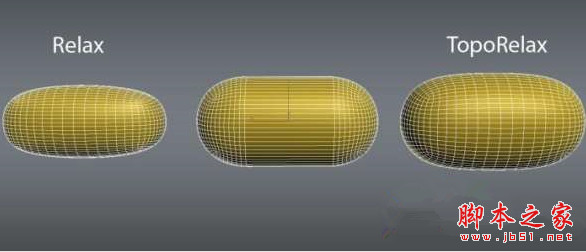
TopoRelax is a 3ds Max modifier which relaxes meshes while preserving their volume unlike the normal relax modifier which shrinks the mesh.
插件功能:
You don’t have to worry about meshes losing their volume while you relax them.
You get a nice evenly distributed quad mesh.
You can be happy about a nice smooth mesh.
支持的3DS MAX版本:
3ds Max 和 3ds Max Design 9/2008/2009/2010/2011/2012/2013/2014/2015/2016/2017/2018 (32 & 64 Bit)
步骤:
关闭3DS MAX
拷贝对应版本里面的TopoRelax.dlm到3DS MAX安装目录下的Plugins文件夹,比如C:\Program Files\Autodesk\3ds Max xxxx\plugins
打开3DS MAX,在列表找到TopoRelax