Task Coach(个人事务管理工具) 1.4.3 免费版
软件大小:130 MB
软件语言:多国语言[中文]
软件类别:应用工具
更新时间:2025-12-29 13:12:00
版本:
应用平台:Win8,Win7,Vista,Win2003,WinXP
- 软件介绍
- 软件截图
- 相关软件
- 相关阅读
- 下载地址
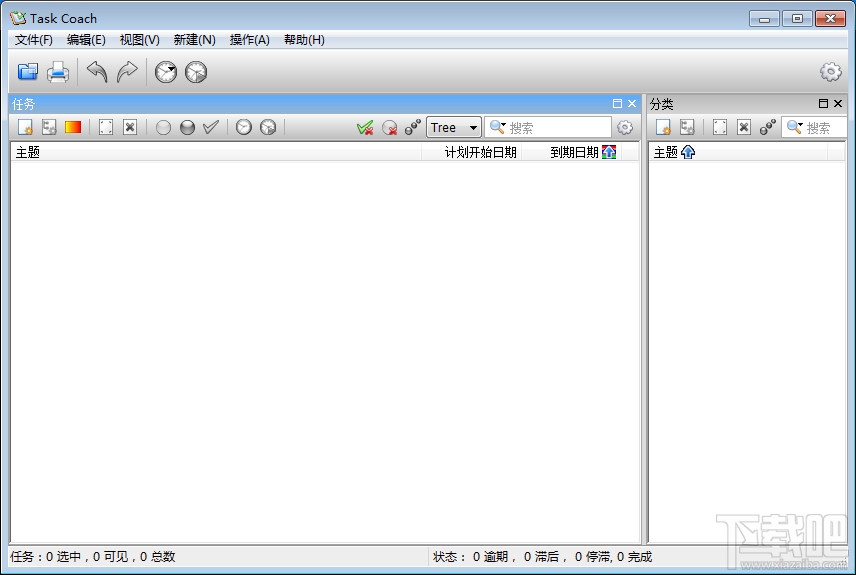
Task Coach 1.4.3免费版是一款出色的个人事务管理工具,它功能丰富且操作便捷,能高效帮你管理各类事务。我特别喜欢它的任务分类功能,可按照工作、学习、生活等不同场景进行细致分类。之前我事务繁杂,常常手忙脚乱,用了这个功能后,能清晰看到不同类别的任务,处理起来有条不紊,大大提升了我的办事效率。
目前,包括创建任务及子任务、设置任务类别、跟踪任务的完成进度、添加任务笔记、打印或输出任务、通知提醒等功能。使用Task Coach这个简单的Todo管理器,相信能让你的工作更加井井有条。
目前Task Coach软件所具备的功能有:
1、添加、删除、修改任务或子任务
2、允许对任务的描述以及各种时间上的安排
3、任务的分类保存
4、过滤器
5、自动保存等
Task Coach更新日志:
Bugs fixed:
Bring back the 'Stop tracking effort' menu item in the context menu of task and effort viewers and make menu's more consistent. (3206702)
Added keyboard shortcuts for adding categories and notes.
The Delete key wasn't working in text controls. (3206464, 3213964)
The Enter key wasn't working in text controls on Mac OS X. (3223714)
The Enter key would stop working after opening and closing a new viewer. (3206366)
Make Ctrl-Z (undo), Ctrl-Y (redo), Enter (edit) and Delete work in edit dialogs.
Fixed a performance issue with the calendar viewer when tracking efforts.
Don't clear the clipboard after pasting an item, so that an item can be pasted multiple times. (3198880 )
Don't try to add deleted prerequisite tasks when loading the task file. (3219001)
Feature added:
Provide more options for filtering completed, due and inactive tasks.