Shotcut 15.01.05 官方版
软件大小:130 MB
软件语言:多国语言[中文]
软件类别:应用工具
更新时间:2026-01-03 08:05:25
版本:
应用平台:Win8,Win7,WinXP
- 软件介绍
- 软件截图
- 相关软件
- 相关阅读
- 下载地址
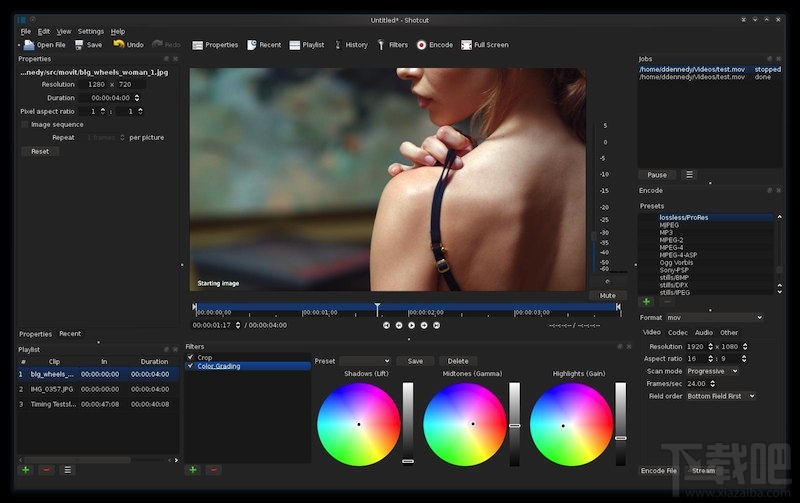
Shotcut 15.01.05官方版是一款功能强大的开源视频编辑软件,支持多种格式,操作简便易上手。我超喜欢它的多轨道编辑功能,这能让我将不同素材精准地放置在不同轨道上。之前我制作旅行视频时,想把风景、人物对话等素材完美融合,多轨道编辑功能让我轻松实现,可分别调整各素材的时间轴、音量等,最终做出的视频效果很棒。
【软件特点】
GPU加速,拖拽处理视频,新版添加了一些视频特效滤镜。如果你对视频处理要求不高,Shotcut还是值得一用的
【Features】
These are all currently implemented features. See the Roadmap for planned features.
supports oodles of audio and video formats and codecs thanks to FFmpeg
supports many image formats such as BMP, GIF, JPEG, PNG, SVG, TGA, TIFF as well as image sequences
no import required - native editing
frame-accurate seeking for many formats
multi-format timeline: mix and match resolutions and frame rates within a project
screen capture (Linux only) including background capture to capture a Shotcut session
webcam capture (Linux only)
audio capture (Linux only; PulseAudio, JACK, or ALSA)
network stream playback (HTTP, HLS, RTMP, RTSP, MMS, UDP)
frei0r video generator plugins (e.g. color bars and plasma)
Blackmagic Design SDI and HDMI for input and preview monitoring
JACK transport sync
deinterlacing
detailed media properties panel
recent files panel with search
drag-n-drop files from file manager
save and load trimmed clip as MLT XML file
load and play complex MLT XML file as a clip
audio signal level meter
volume control
scrubbing and transport control
flexible UI through dock-able panels
encode/transcode to a variety of formats and codecs thanks to FFmpeg (or libav as-built)
capture (record) SDI, HDMI, webcam (V4L2), JACK audio, PulseAudio, IP stream, X11 screen, and Windows DirectShow devices
stream (encode to IP) files and any capture source
batch encoding with job control
create, play, edit, save, load, encode, and stream MLT XML projects (with auto-save)
unlimited undo and redo for playlist edits including a history view
connect to Melted servers over MVCP TCP protocol
control the transport playback of Melted units
edit Melted playlists including suport for undo/redo
OpenGL GPU-based image processing
multi-core parallel image processing (when not using GPU and frame-dropping is disabled)
video filters: Blur, Color Grading, Crop, Diffusion, Glow, Invert Colors, Mirror, Opacity, Rotate, Saturation, Sepia Tone, Sharpen, Size and Position, Stabilize, Text, Vignette, Wave, White Balance
audio filters: Balance, Copy Channel, Downmix, Gain, Normlize, Pan, Swap Channels
3-way (shadows, mids, highlights) color wheels for color correction and grading
eye dropper tool to pick neutral color for white balancing
UI translations: Catalan, Chinese, Czech, Danish, English, French, German, Portugese, Spanish (not all 100%, but you can help)
HTML5 (sans audio and video) as video source and filters
Leap Motion for jog/shuttle control
DeckLink SDI keyer output
UI themes/skins: native-OS look and custom dark and light
control video zoom in the player: fit viewable area (default), 50%, original (100%), and 200%
multitrack timeline with thumbnails and waveforms
thumbnail and waveform caching between sessions
audio mixing across all tracks
video compositing across video tracks
trimming (on timeline)
append, insert, overwrite, lift, and delete (ripple) editing on the timeline
3-point editing
external monitoring on an extra system display/monitor
fade in and out audio and fade video from and to black with easy-to-use fader controls on timeline
cross-fade audio and video dissolve transitions easily by overlapping shots on the same track of the timeline
video wipe transitions: bar, barn door, box, clock (radial), diagonal, iris, matrix, and custom gradient image