TCPLogView x64 1.1.6 绿色版
软件大小:130 MB
软件语言:简体中文
软件类别:应用工具
更新时间:2026-01-03 13:14:00
版本:
应用平台:Win10,Win8,Win7,WinXP
- 软件介绍
- 软件截图
- 相关软件
- 相关阅读
- 下载地址
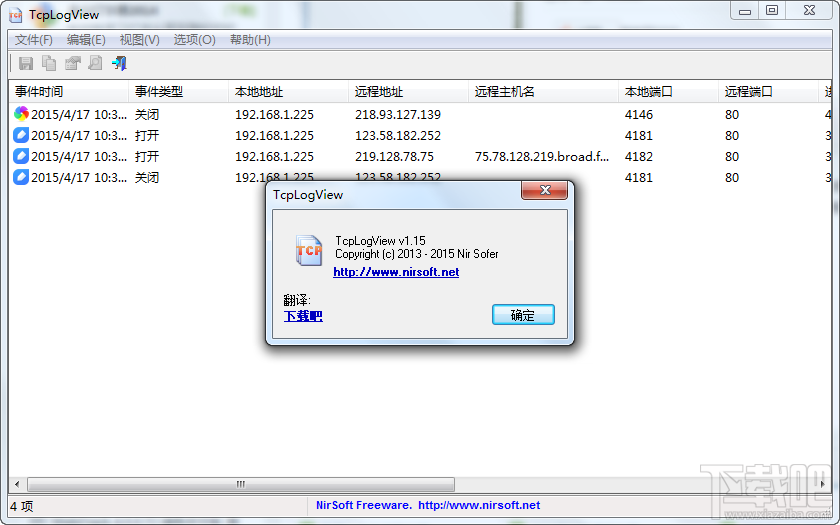
TCPLogView x64 1.1.6 绿色版是一款强大的 TCP 日志查看工具,无需安装,方便携带。它能实时监控 TCP 连接,并以详细日志呈现。
我特别喜欢它的日志筛选功能。之前我排查网络问题时,面对海量杂乱的 TCP 日志无从下手。用了这款软件,通过筛选功能,我能快速定位到特定 IP 或端口的日志信息,大大节省了排查时间,让问题迅速得到解决。
使用说明:
1开启后,便会开始捕捉属于TCP的包含使用的程式名称、日期时间、本地与远端IP等等活动资讯。
2.用滑鼠右键点击功能来导出纪录或是点击[Properties]来看更详细的内容。
更新日志:
Versions 1.15:
Added 'Write To Log File' option. When it's turned on, all log lines are automatically written to TcpLogView.csv located in the same folder of TcpLogView.exe
Versions 1.12:
Added integration with IPNetInfo utility
Versions 1.11:
'No Local-Host Connections' option now also works with IPv6 loopback address.
Versions 1.10:
Added 'No Local-Host Connections' option. When it's turned on, connections with 127.0.0.1 in both 'Local Address' and 'Remote Address' will not be added.
Versions 1.06:
Fixed bug: The 'Resolve IP Addresses' feature failed to work on some versions of Windows. (Ooops... I forgot to initialize the Winsock DLL...)
Versions 1.05:
Added 'Scroll Down On New Line' option. If it's turned on, TcpLogView automatically scrolls to the bottom when a new line is added.
Versions 1.00 - First release.