jq.exe 一个轻量级且灵活的命令行JSON处理器 v1.7.1
软件大小:962KB
软件语言:英文软件
软件类别:应用工具
更新时间:2026-01-16 11:07:29
版本:v1.7.1
应用平台:Windows平台
- 软件介绍
- 软件截图
- 相关软件
- 相关阅读
- 下载地址
jq.exe v1.7.1是一款轻量级又灵活的命令行JSON处理器,强大实用是其亮点。我超喜欢它的格式化功能,直接在命令行用简单命令就能把杂乱无章的JSON数据按规范格式排列整齐。之前我处理一份复杂JSON数据时,内容嵌套多层且格式混乱,根本没法看。有了jq.exe,一瞬间数据结构清晰呈现,极大提高处理效率,查找与分析数据也变得轻松多了。
jq类似于用于JSON数据的sed——你可以使用它来切片、过滤、映射和转换结构化数据,就像sed、awk、grep和朋友们让你玩文本一样简单。
jq是用可移植C编写的,它没有运行时依赖关系。您可以下载一个二进制文件,将其scp到同一类型的远程机器上,并期望它能够工作。
jq可以毫不费力地将您拥有的数据格式转换为您想要的格式,并且执行此操作的程序通常比您预期的更短、更简单。
JQ使用方法
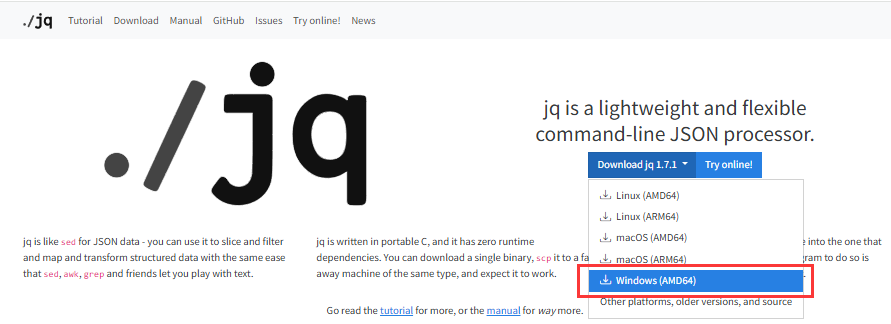
下载适合 Windows 的jq
为了在 Windows 上使用jq,需要先从官方网站或其他可信资源下载适用于 Windows 的可执行文件。通常可以找到.exe文件版本。
可以从本站下载或者从官方网站下载jq.exe
选择与系统架构相匹配的压缩包(例如jq-win64.exe对于 64 位系统),并将其解压到本地磁盘中的合适位置。
下载的文件名为jq-windows-amd64.exe 可以修改为 jq.exe,方便调用。
type old.json | jq.exe >> C:\Users\LTH\Desktop>new.json
old.json是你要格式化的文件,new.json是格式化完后的文件。
EZ,搞定了。
配置环境变量以便全局调用
为了让命令提示符能够识别jq并允许在整个计算机范围内运行此程序而无需指定完整路径:
- 将解压后的
jq.exe所处目录添加至系统的 PATH 环境变量中; - 或者直接把
jq.exe移动到已存在于 PATH 中的一个现有文件夹内,比如C:\Windows\System32\.
完成以上设置后,在任意 CMD 或 PowerShell 终端窗口输入jq --version来验证是否成功加载该软件及其具体版本号。
测试安装
一旦完成了上述步骤,则可以通过打开一个新的命令行会话来测试jq是否正常工作。尝试打印帮助信息以确认一切就绪:
jq --help
如果显示了详细的帮助文档说明,则表明jq已经被正确安装并且可以在 Windows 上正常使用了。
jq命令行参数
jq --help jq - commandline JSON processor [version 1.7.1] Usage: jq [options] <jq filter> [file...] jq [options] --args <jq filter> [strings...] jq [options] --jsonargs <jq filter> [JSON_TEXTS...] jq is a tool for processing JSON inputs, applying the given filter to its JSON text inputs and producing the filter's results as JSON on standard output. The simplest filter is ., which copies jq's input to its output unmodified except for formatting. For more advanced filters see the jq(1) manpage ("man jq") and/or https://jqlang.github.io/jq/. Example: $ echo '{"foo": 0}' | jq . { "foo": 0 } Command options: -n, --null-input use `null` as the single input value; -R, --raw-input read each line as string instead of JSON; -s, --slurp read all inputs into an array and use it as the single input value; -c, --compact-output compact instead of pretty-printed output; -r, --raw-output output strings without escapes and quotes; --raw-output0 implies -r and output NUL after each output; -j, --join-output implies -r and output without newline after each output; -a, --ascii-output output strings by only ASCII characters using escape sequences; -S, --sort-keys sort keys of each object on output; -C, --color-output colorize JSON output; -M, --monochrome-output disable colored output; --tab use tabs for indentation; --indent n use n spaces for indentation (max 7 spaces); --unbuffered flush output stream after each output; --stream parse the input value in streaming fashion; --stream-errors implies --stream and report parse error as an array; --seq parse input/output as application/json-seq; -f, --from-file file load filter from the file; -L directory search modules from the directory; --arg name value set $name to the string value; --argjson name value set $name to the JSON value; --slurpfile name file set $name to an array of JSON values read from the file; --rawfile name file set $name to string contents of file; --args consume remaining arguments as positional string values; --jsonargs consume remaining arguments as positional JSON values; -e, --exit-status set exit status code based on the output; -b, --binary open input/output streams in binary mode; -V, --version show the version; --build-configuration show jq's build configuration; -h, --help show the help; -- terminates argument processing; Named arguments are also available as $ARGS.named[], while positional arguments are available as $ARGS.positional[].
更新日志
13 December 2023
jq 1.7.1 released. Security (CVE-2023-50246, CVE-2023-50268) and bug fixes. Seerelease notesfor details.
7 September 2023
After a five-year hiatus, we've returned with a revitalizedGitHub organizationand a much-anticipated 1.7 release, thanks to our new admins and maintainers. Check out thedownloadpage for installation options and see therelease notesfor details.