maya2026破解文件 V1.0 免费版
软件大小:6.4MB
软件语言:简体中文
软件类别:应用工具
更新时间:2026-01-24 01:53:02
版本:v1.0 免费版
应用平台:Windows平台
- 软件介绍
- 软件截图
- 相关软件
- 相关阅读
- 下载地址
Maya2026破解文件V1.0免费版,能让你免费使用Maya强大功能。这款软件是3D建模、动画制作、渲染等领域的佼佼者,功能全面且强大。我很喜欢它的智能材质库功能,以往为模型找合适材质很费时间,有了这个功能,能快速在丰富的材质库中找到理想材质,直接应用到模型上,大大提高了我的工作效率。
【使用说明】
关闭杀毒,防止误删
安装Autodesk软件,但是不要启动,安装完成后重启电脑
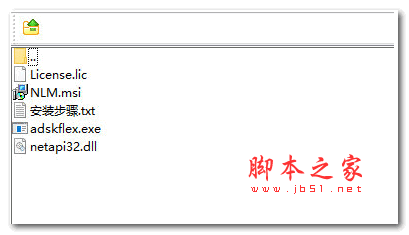
安装NLM.msi,默认安装到C:\Autodesk\Network License Manager,停止lmgrd, adskflex等的服务,拷贝adskflex.exe过去替换
拷贝netapi32.dll 到C:\Program Files (x86)\Common Files\Autodesk Shared\AdskLicensing\Current\AdskLicensingAgent\
用记事本打开License.lic,将里面的HOSTNAME 和 MAC修改成自己电脑的计算机名和MAC地址(具体查询方法可以自行查找,MAC地址中间不用添加-),保存后放到C:\Autodesk\Network License Manager
在C:\Autodesk\Network License Manager里启动lmtools.exe
在config services里,Service Name修改成Autodesk
Path to the Imgrd.exe file里选择 C:\Autodesk\Network License Manager\lmgrd.exe
Path to the license file里选择C:\Autodesk\Network License Manager\lic.dat
勾选’start server at power up’ 和 ‘use services’
点击Save Service保存
在service/license file选择 configuration using services 勾选LMTOOLS ignore license file path environment variables
在start/stop/read点击start server
点击ReReadlicense file,如果下面提示出现error之类的错误,表示用户名或者MAC地址写错了
– 在server status点击perform status enquiry’
启动软件
– 选择Use a network license
– 选择Single license server
-填写127.0.0.1或者localhost