PolyDamage(3DS MAX模型破损添加细节纹理雕刻插件)V1 免费版
软件大小:171KB
软件语言:简体中文
软件类别:应用工具
更新时间:2026-02-06 20:41:31
版本:v1 免费版
应用平台:Windows平台
- 软件介绍
- 软件截图
- 相关软件
- 相关阅读
- 下载地址
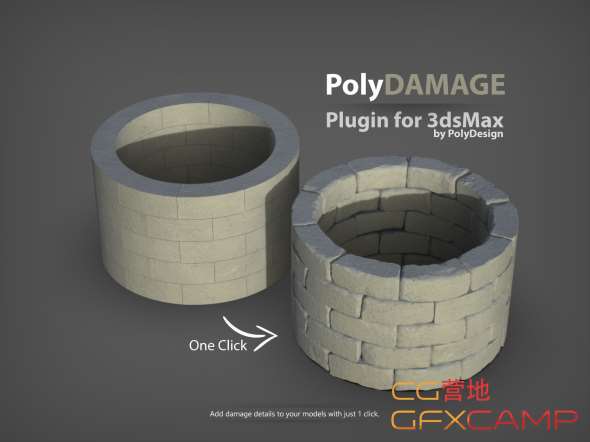
PolyDamage是一款免费的3DS MAX模型破损添加细节纹理雕刻插件。它最大的亮点在于能为模型快速添加逼真的破损细节和纹理,让模型瞬间变得更加生动真实。
我特别喜欢它的自定义破损纹理功能。之前我在制作一个老旧建筑模型时,想要呈现出墙面斑驳、砖块脱落的效果,用传统方法既耗时又难以达到理想效果。用了这个功能,我能轻松添加各类破损纹理,大大节省时间,模型效果也十分出色。
PolyDamage plugin is a tool to quickly add damage and imperfections to models.
Nothing is perfect in real life, so adding damage to your models make them look more realistic.
PolyDamage is a quick alternative to manually sculpting damage with other software packages.
PolyDamage adds an extra realism to concrete walls, grounds, stones, columns.
PolyDamage quickly adds damage to corners and edges.
Since it is procedural, you can make millions of damage variations of one single object.
You can save the seed value of damage and next time you can get the same result with this seed value.
You can adjust the parameters and adjust the depth of damage, or edge damage amount.
Adjust the resolution slider to increase the level of detail in damaged areas.
PolyDetail gives a unique material ID for damaged faces so you can apply a spesific damage material to only damaged faces.
安装步骤:
拷贝polydamage_nm.mse到C:\Program Files\Autodesk\3ds Max 2018\scripts
拖拽polydamage_macro.ms到3DS MAX视窗完成安装
顶部菜单,自定义-自定义用户界面-键盘 找到PolyDamageV1,分配一个快捷键即可