Bluetooth LE for iOS and Android v2.3 Unity蓝牙插件 免费版(附设置方法)
软件大小:579KB
软件语言:英文软件
软件类别:应用工具
更新时间:2026-02-10 21:33:51
版本:v2.3 Unity蓝牙插件 免费版(附设置方法)
应用平台:Windows平台
- 软件介绍
- 软件截图
- 相关软件
- 相关阅读
- 下载地址
Bluetooth LE for iOS and Android v2.3是一款免费的Unity蓝牙插件,支持iOS和安卓系统,还附带设置方法,亮点在于能让开发者轻松实现蓝牙功能集成,节省开发时间。我超喜欢它的设备扫描功能,之前开发一款需与蓝牙设备交互的应用时,手动实现设备扫描很麻烦且易出错,用了这插件后,它能快速精准扫描周边蓝牙设备,大大加快了开发进度。
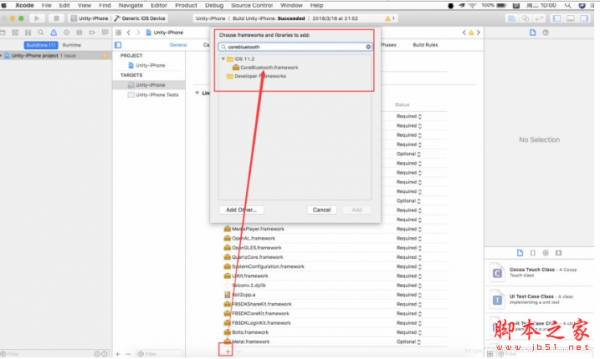
需要导入的插件,都选择Bluetooth+LE+for+iOS+and+Android+v2.3,API不需要改变,不同的地方在于Xcode部署的时候需要设置一番。
IOS蓝牙权限配置
在Build Phases中搜索文件UnityBluetoothLE.mm,然后在compiler flags中双击填写加入-fno-objc-arc。
使用方法
1、新建一个Unity5.6工程,导入正版Bluetooth LE for iOS tvOS and Android.unitypackage
2、用JD-GUI反编译工具查看unityandroidbluetoothlelib.jar
3、将反编译的代码拷贝出来,建立对应的文件目录,
4、在Eclipse中建立空工程,将代码文件放进去。
5、修改AndroidManifest.xml,添加蓝牙权限
<uses-permission android:name="android.permission.BLUETOOTH_ADMIN"/>
<uses-permission android:name="android.permission.BLUETOOTH"/>
<uses-permission android:name="android.permission.ACCESS_COARSE_LOCATION"/>
<uses-feature android:name="android.hardware.bluetooth_le" android:required="false"/>
6、将unity-classes.jar文件添加到libs目录下.这个jar文件可以从Unity导出一个Android工程中找到
7、修改其中的3处错误
(A)注释的这个
//import android.bluetooth.le.ScanSettings.Builder;
(B)
private UUID getFullBluetoothLEUUID(String uuidString)函数中UUID uuid;重定义了
(C)
public class AdRecordList类中的
this.Records.add(new UnityBluetoothLE.AdRecord(UnityBluetoothLE.this, length, type, data));
改为this.Records.add(new UnityBluetoothLE.AdRecord(length, type, data));

-
Bluetooth LE for iOS and Android v2.3 Unity蓝牙插件 免费版(附设置方法)下载地址