Maya实时材质创建编辑脚本Gumroad ShadeIt 2.0 for Maya 2017-2019 免费版
软件大小:336.6MB
软件语言:英文软件
软件类别:应用工具
更新时间:2026-02-11 04:42:07
版本:
应用平台:Windows平台
- 软件介绍
- 软件截图
- 相关软件
- 相关阅读
- 下载地址
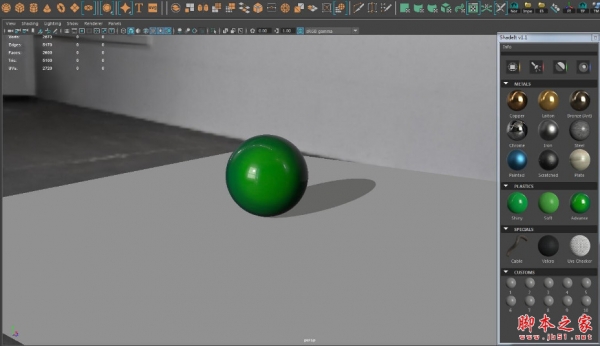
Gumroad ShadeIt 2.0 for Maya 2017 - 2019免费版是一款用于Maya的实时材质创建编辑脚本,它能让用户高效且便捷地完成材质设计。我特别喜欢它的实时预览功能,以往在创建材质时,每次修改都要等待一段时间才能看到效果,特别影响效率。而有了这个实时预览功能,修改材质后能立刻看到呈现的效果,大大节省了时间,让创作过程更加流畅。
脚本支持Maya 2017 -Maya 2019 Windows和MaOS。
本平台提供最新ShadeIt2.0网盘下载,内含视频安装使用教程,需要的朋友可下载试试!
ShadeIt is a script for Maya that will help you to easily create and edit realtime shaders for Maya viewport 2.0!ShadeIt is a companion for your HardSurface stuff. Shaders are build to give the best look on Viewport. The idea is to shade you model while your modeling! It's not dedicated to final texturing/shading. It's more like a quick shading blocking, that's will help you during your modeling and give you the ability to make nice presentation without rendering etc.ShadeIt is working on Maya 2017 to 2019 for Windows and MacOs.
安装方法
对于安装,强烈建议您遵循视频“ShadeIt Tuto 01”。
1、复制/替换"ShadeIt”文件夹到 ..../Documents\maya\(version)\prefs\scripts
2、在Maya中打开脚本编辑器
3、创建一个新的"Python”项卡
4、拖拽SHIDET.PY文件或复制/粘贴SHIDEIT.TKT内容
5、CTRL+A选择所有脚本和middle mouse bouton,拖拽到架子上创建图标。
ShadeIt 2.0
For installation I hightly recommand you to follow the video "ShadeIt Tuto 01".
1 - Copy/Replace "ShadeIt" folder to > ..../Documents\maya\(version)\prefs\scripts
2 - In Maya open the Script Editor
3 - Create a new tab "Python"
4 - Drag and Drop ShadeIt.py file or copy/paste ShadeIt.tkt content.
5 - Ctrl+A for select all script and middle mouse bouton, drag'n drop to shelf to create an icon.

-
Maya实时材质创建编辑脚本Gumroad ShadeIt 2.0 for Maya 2017-2019 免费版下载地址