PTC CREO 3.0 M150 破解文件 32位/64位 附官方程序+使用方法
软件大小:1.0MB
软件语言:简体中文
软件类别:应用工具
更新时间:2026-02-27 04:16:59
版本:
应用平台:Windows平台
- 软件介绍
- 软件截图
- 相关软件
- 相关阅读
- 下载地址
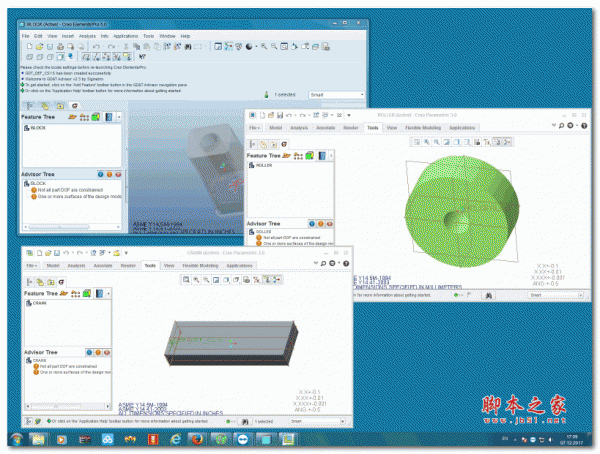
PTC CREO 3.0 M150是一款功能强大的3D设计软件,支持32位和64位系统,还附带官方程序与使用方法,破解文件让使用更便捷。我超喜欢它的参数化设计功能,在设计复杂机械零件时,只需修改参数就能快速调整模型,大大节省了设计时间,避免了重复建模的麻烦,让设计工作更高效。
官方介绍
CREO是美国PTC公司于2010年10月推出CAD设计软件包。CREO是整合了PTC公司的三个软件Pro/Engineer的参数化技术、CoCreate的直接建模技术和ProductView的三维可视化技术的新型CAD设计软件包,是PTC公司闪电计划所推出的第一个产品。CREO是一个整合Pro/ENGINEER、CoCreate和ProductView三大软件并重新分发的新型CAD设计软件包,针对不同的任务应用将采用更为简单化子应用的方式,所有子应用采用统一的文件格式。 CREO目的在于解决CAD系统难用及多CAD系统数据共用等问题。
PTC CREO 3.0 M150 32位官方程序下载地址:点击下载
PTC CREO 3.0 M150 64位官方程序下载地址:点击下载
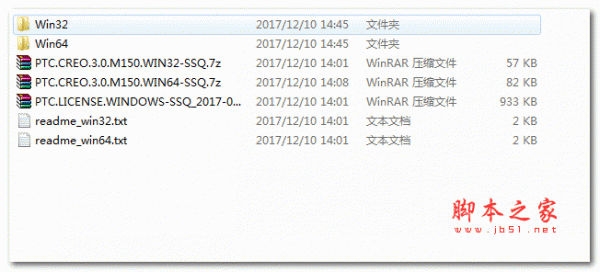
CREO 3.0 M150 32位破解文件使用步骤
1. Unzip "PTC.LICENSE.WINDOWS-SSQ.7z" to temporary directory
and run "FillLicense.bat". The "PTC_D_SSQ.dat" file near batch script
contains the license file with correct PTC HOSTID will be generated
Copy generated license file to folder of choice (for example, C:\Program Files\PTC)
2. Create enviroment variable PTC_D_LICENSE_FILE=<full path to PTC_D_SSQ.dat>
3. Install PTC Creo 3.0 M150 Win32
3.1. Copy folders "Distributed Services Manager" and "M150" from "PTC.CREO.3.0.M150.WIN32-SSQ.7z"\Creo 3.0 folder to <Creo 3.0 program folder> (by default C:\Program Files\PTC\Creo 3.0\ ) with overwrite
3.2. Copy folder "View Express" from "PTC.CREO.3.0.M150.WIN32-SSQ.7z"\Creo 3.1 folder to <Creo 3.1 program folder> (by default C:\Program Files\PTC\Creo 3.1\ ) with overwrite
4. Install PTC Mathcad Prime 3.1 Win32 (optional)
4.1. Replace original <Mathcad Prime 3.1 program folder> (by default C:\Program Files\PTC\Mathcad Prime 3.1 ) with cracked one from "PTC.CREO.3.0.M150.WIN32-SSQ.7z"
5. Run "SolidSQUADLoaderEnabler.reg" and confirm to add info into Windows Registry
6. REBOOT
7. Enjoy!
CREO 3.0 M150 64位破解文件使用步骤
1. Unzip "PTC.LICENSE.WINDOWS-SSQ.7z" to temporary directory
and run "FillLicense.bat". The "PTC_D_SSQ.dat" file near batch script
contains the license file with correct PTC HOSTID will be generated
Copy generated license file to folder of choice (for example, C:\Program Files\PTC)
2. Create enviroment variable PTC_D_LICENSE_FILE=<full path to PTC_D_SSQ.dat>
3. Install PTC Creo 3.0 M150 Win64
3.1. Copy folders "Distributed Services Manager", "M150" and "View Express" from "PTC.CREO.3.0.M150.WIN64-SSQ.7z"\Creo 3.0 folder to <Creo 3.0 program folder> (by default C:\Program Files\PTC\Creo 3.0\ ) with overwrite
3.2. Copy folder "View Express" from "PTC.CREO.3.0.M150.WIN64-SSQ.7z"\Creo 3.1 folder to <Creo 3.1 program folder> (by default C:\Program Files\PTC\Creo 3.1\ ) with overwrite
4. Install PTC Mathcad Prime 3.1 Win64 (optional)
4.1. Replace original <Mathcad Prime 3.1 program folder> (by default C:\Program Files\PTC\Mathcad Prime 3.1 ) with cracked one from "PTC.CREO.3.0.M150.WIN64-SSQ.7z"
5. Run "SolidSQUADLoaderEnabler.reg" and confirm to add info into Windows Registry
6. REBOOT
7. Enjoy!

相关软件
相关阅读
最新软件


猜您喜欢
-
 酷比魔方 K8GTB平板电脑固件1.02
 -
 ColorVeil(屏幕色彩设置软件) v1.0.0.5 绿色免费版
 -
 iMazing(第三方苹果管理软件) v2.10.6 绿色特别版 64位
 -
 超级转换秀白金版 超极本专版 38.5.9000.0 官方版
 -
 吉他放大器套件 Kuassa Amplifikation-360 v1.0.2 最新免费版
 -
 三维行星AE插件Videocopilot ORB AfterEffects 1.0.3 64位 安装版(附教程+6K地图贴图)
 -
 星辰日历 V1.0.0 官方安装版
 -
 七彩虹Colorfly E976 Q1四核平板电脑安卓4.4.2固件
 -
 虎嗅(资讯阅读软件) v9.8.2 安卓手机版