多边形平滑组插件PolySmoother v2.6.4 for 3ds Max 2016-2026 免费版(附方法)
软件大小:23.5MB
软件语言:英文软件
软件类别:应用工具
更新时间:2026-02-27 09:20:41
版本:v2.6.4 for 3ds Max 2016-2025 免费版(附方法)
应用平台:Windows平台
- 软件介绍
- 软件截图
- 相关软件
- 相关阅读
- 下载地址
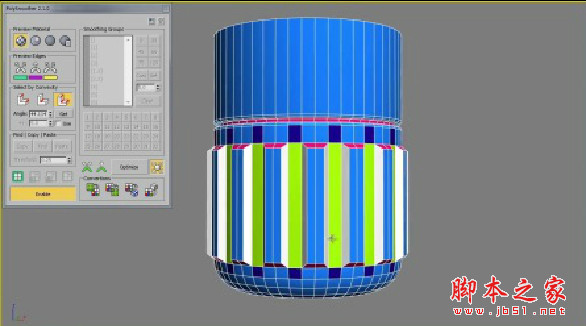
PolySmoother v2.6.4是款专为3ds Max 2016 - 2026打造的多边形平滑组插件,免费且还附使用方法,堪称建模神器。它能快速、精准地对多边形进行平滑处理,大大提升建模效率与质量。我超喜欢它的智能识别功能,之前处理复杂模型的平滑组时,手动调整特别繁琐,有了这个功能,它能自动识别多边形边界,快速完成平滑设置,节省了大量时间和精力。
安装方法:
拖放MZP文件到3DSmax窗口或运行从菜单脚本->运行脚本(Maxscript -> Run Script)
按“安装”按钮
找到“polysmoother”类别中的“自定义用户界面”对话框
Just install & enjoy:
- Drag&drop the MZP file into 3dsmax window or run it from the menu Maxscript -> Run Script
- Press "Install" button
- Find the "PolySmoother" category in "Customize User Interface" dialog
软件截图

-
多边形平滑组插件PolySmoother v2.6.4 for 3ds Max 2016-2026 免费版(附方法)下载地址