C4D顶点法线插件Vertex Normal Tool v1.04 for Cinema 4D R15-R21 免费版
软件大小:232KB
软件语言:英文软件
软件类别:应用工具
更新时间:2026-03-01 10:29:04
版本:vertex Normal Tool v1.04 for Cinema 4D R15-R21 免费版
应用平台:Windows平台
- 软件介绍
- 软件截图
- 相关软件
- 相关阅读
- 下载地址
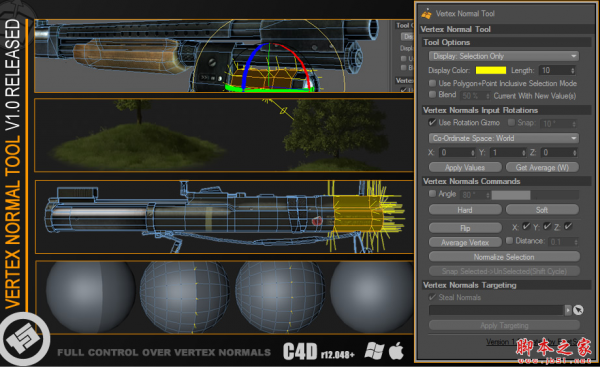
Vertex Normal Tool v1.04 是一款专为 Cinema 4D R15 - R21 打造的免费顶点法线插件,亮点在于它能高效精准地处理顶点法线相关问题,提升建模效率。
我超喜欢它的“法线快速重置”功能。之前做复杂模型时,法线方向错乱导致阴影显示异常,手动调整极为繁琐。有了这个功能,一键就能让法线恢复正常,不仅节省大量时间,还让模型光影效果瞬间变得完美,大大提升了工作效率。
几乎所有其他高端三维软件(3ds Max,Maya,…)都支持顶点法线编辑,虽然c4d支持导入和渲染顶点法线,但它缺乏任何接口或工具用于创建或编辑它们。VNT旨在解决这个问题,通过给艺术家完全控制顶点法线。
Vertex Normal Tool轻松添加新的顶点法标记对象,同时保留任何phong角和边缘断裂。轻松地更新和操作顶点法线,执行所有常见的任务,flipping, averaging, normalizing,设置硬边或软边缘,通过选集或角,等等…内置函数,轻松地处理常见的顶点法线技巧。
VERTEX NORMAL EDITING IN C4D
VNT is a plug-in for C4D which adds a tool for creating and manipulating vertex normals on polygon objects in C4d.
VERTEX NORMALS
Virtually all other high-end 3d applications (3ds Max, Maya, …) support vertex normal editing and while c4d supports importing and rendering vertex normals it lacks any interface or tool for creating or editing them. VNT aims to address that problem by giving the artist full control over vertex normals.
Complete tool kit which adds the ability to really work with vertex normals on par with other high-end 3d software.
C4D插件安装方法:
复制插件到C:\Program Files\MAXON\CINEMA 4D R18\plugins即可
插件支持(Win/Mac):
Cinema 4D R18,R20,R21

-
C4D顶点法线插件Vertex Normal Tool v1.04 for Cinema 4D R15-R21 免费版下载地址